ABS | |
| Syntax : | ABS( any_numeric_value) |
| Parameters : | any_numeric_value: Any positive or negative numbers
|
| Example: | 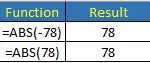 |
| |
ACCRINT | |
| Syntax: | ACCRINT( issue, first_interest, settlement, rate, [par], frequency, [basis], [calc_method] ) |
| Parameters: | Issue: The date the security is issued.
first_interest: The date when the initial interest is paid.
settlement: The settlement date of the security.
rate: The annual interest rate or coupon when the security was issued.
par: The par value of the security.
frequency: The number of coupon payments per year:
1 = annual
2 = semi annual (default)
4 = quarterly
basis (Optional): The type of day counting to use:
0 = US 30/360 (default)
1 = Actual/Actual
2 = Actual/360
3 = Actual/365
4 = European 30/360
calc_method (Optional): The start date for the accrued interest:
True = start accruing interest from the issue date.
False = start accruing interest from the last coupon payment date." |
| Example: |  |
| |
DATEDIF | |
| Syntax: | DATEDIF(start_date,end_date,unit) |
| Parameters: | Start_date: Start dates (for example, "1/1/2017")
End_date: Last date (for example, "4/10/2017")
Unit can be entered as upper case or lowe case:
"Y" = year
"M" = month
"D" = day
"MD" = The number of days. Months are ignored.
"YM" = The number of months. Years are ignored
"YD" = he number of days. Years are ignored |
| Example: | 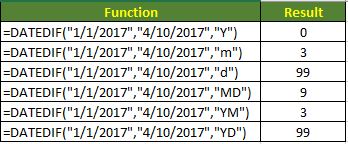 |
| |
COUNTIF | |
| Syntax: | COUNTIF (range, criteria) |
| Parameters: | range - The range of cells to count.
criteria - The criteria that controls which cells should be counted. |
| Example: | COUNTIF(A1:A11, 40) -> Count cells equal to 40
COUNTIF(A1:A11," > 40") -> Count cells greater than 40
COUNTIF(A1:A11, "Ben") -> Count cells contains the word "Ben"
COUNTIF(A1:A11, "<" & B2) -> Count cells less than the value in B2
COUNTIF(C85,"*criteria") -> Count in cel C85 contain any words on the left and the word "criteria"
COUNTIF(C85,"criter?a") -> Count in cel C85 contain "criter" and "a" with any letter in between |
| |
COUNTIFS | |
| Syntax: | COUNTIFS(range1, criteria1, range2, criteria2]…) |
| Parameters: | range1 - The range of cells to count in range1.
criteria1 - The criteria that controls in range1 to be counted.
range2 - The range of cells to count in range2.
criteria2 - The criteria that controls in range2 to be counted. |
| Example: | COUNTIFS(B2:B7,">0", C2:C7,"=0") |
| Evaluate the range B2 to B7 with value greater than 0 and range C2 to C7 with value of 0 |
